
Platform Updates
Stay up to date with new features, improvements, and fixes across Aire Labs. Updates are organized chronologically, with the most recent changes at the top.Manage your own team Platform
Adding a colleague, changing what someone can do, or removing access used to mean emailing us and waiting. Admins can now do all three from Team Members in the organization menu: send an invitation, resend or revoke one that is outstanding, set someone as an admin, member, or viewer, and remove anyone who has left.Protect a scenario from edits Collaboration
Add editors to a scenario and it becomes protected. Only the people on that list can change it, by any route: editing the scenario directly, asking Aire AI to make the change, or merging a branch into it. Use it to hold a base case steady while the rest of the team branches from it freely. Anyone except a viewer can add themselves to the list, so this guards a base case against accidental edits rather than locking a colleague out. A scenario with no editors listed stays open to everyone, and this is default behavior with nothing to switch on.Bug Fixes
- Aire AI confirms a broad change before making it — A request that touches many terms without naming them now comes back for confirmation instead of being applied straight away.
Merge a working scenario back into your base case Collaboration
Testing a change in its own scenario required deciding manually which edits were worth keeping, then re-entering them somewhere else.You can now merge a working scenario into a target scenario (such as the Base scenario), review the modified terms before anything is merged, and maintain a versioned record of what was modified. Select the target, deselect any change you do not want to merge, add notes about the changes, and merge the changes into the target.If someone modifies the target scenario while you are reviewing the changes, Aire holds the merge and shows you the current version first.Sweep two inputs at once Modeling
Two-way data tables are now generally available!With a single form, you can create every sensitivity study. Choose the study type, specify the inputs to study, and see how an output responds across the whole grid rather than looking at one variable at a time. Studies run in the background so you can continue your work. The grid will show you in real time which cells in the data table have been computed, and which are still being processed.Improvements
- Currency shows its currency code A value in dollars per kilowatt-hour reads as USD/kWh rather than a bare symbol, unless your organization has set its own display preference.
Bug Fixes
- Re-running a sensitivity study replaces its old results After a model was reloaded, running the same study again added a second set of outputs beside the first instead of replacing them. One run now leaves one set of results.
Set your organization’s units Modeling
Set default units for your organization and register custom units for your models. See how project-specific units combine with those defaults.Improvements
- Light and dark themes — Aire follows your system theme or keeps the theme you choose, and remembers the setting between sessions.
- Consistent chart labels — Charts on the same page use consistent number abbreviations, making values easier to compare.
- Cash flow charts label calendar years — The x-axis uses years instead of period numbers.
Bug Fixes
- Unit display is more consistent — Units now display consistently while editing values and reviewing formulas.
Improvements
- New formula functions —
transpose(),iserror(),iferror(), date minus date subtraction, and array broadcasting inpmt,fv,pv,left, andright.
Bug Fixes
- GOALSEEK on long SCAN-based forecasts now converges — Fixed a timeout that prevented GOALSEEK from finishing on complex SCAN-based models, including debt-sizing with long forecast horizons.
- Formula editing restored — Fixed an issue where formulas could not be edited in some contexts.
Overview charts are now available to every account Views
Overview charts are now available to every account. Generate charts in one click, vary them across scenarios, and share them with your team. A faster way to review outputs and build confidence in your model without leaving Aire.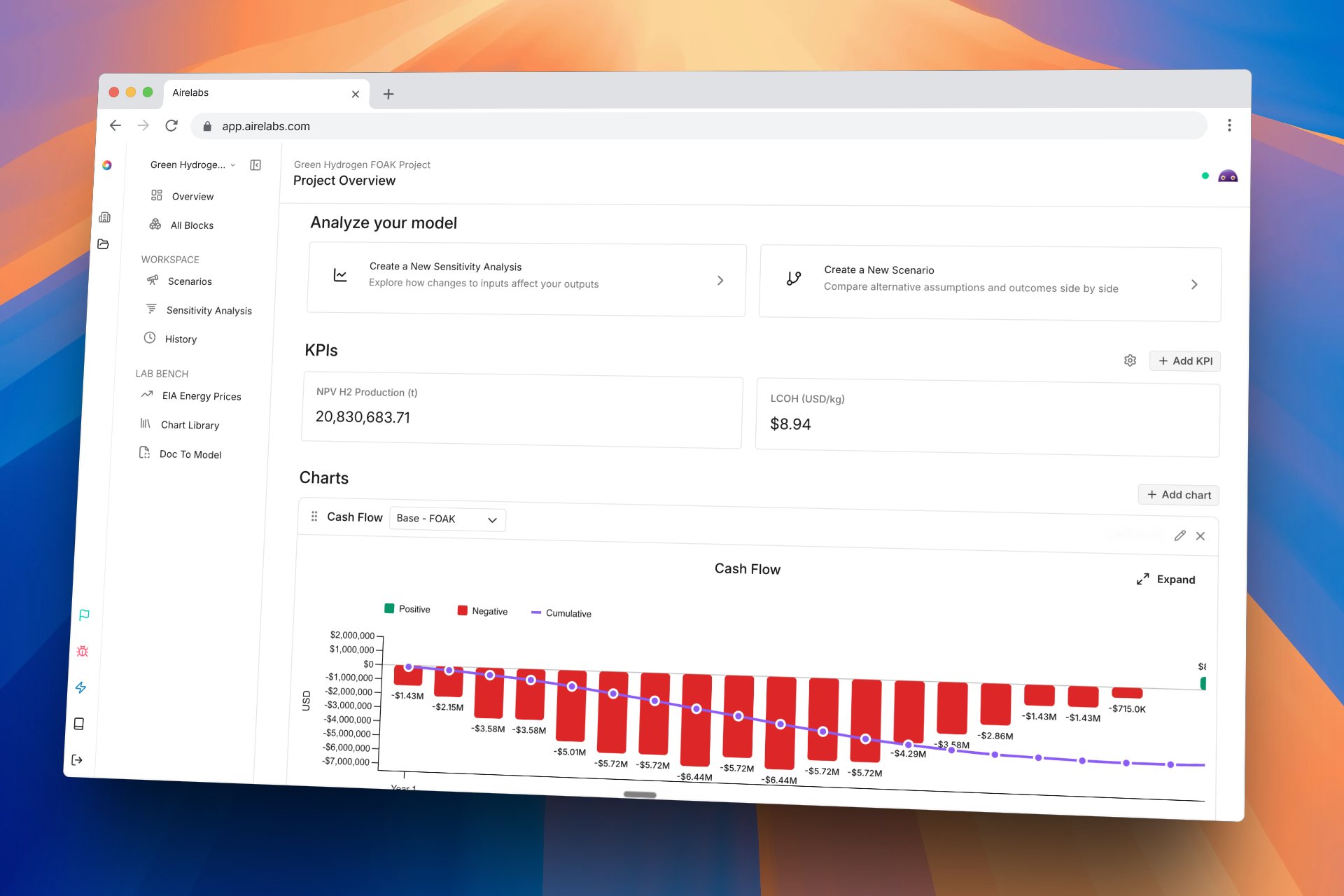
Compare structurally different scenarios side by side Scenarios
In the all blocks view, terms that exist only in the compared scenario now appear under their parent block. Aire projects mixed-unit cells into a common unit before computing variance, so comparisons reflect real differences rather than unit mismatches. Compare columns refresh live when a teammate edits the compared scenario.Improvements
- Scenarios list updates in real time — Additions, removals, and renames from teammates appear immediately.
- Child scenarios reflect parent edits immediately — Edits to a parent scenario propagate to its children without a manual refresh.
- Standalone clones no longer show inheritance controls — Clones without a parent hide the inheritance UI that does not apply to them.
- Scenario panel: stable width, label-picker dropdown, tidier column controls — The panel no longer jumps width on open, the label picker is now a dropdown, and column visibility controls are easier to scan.
- Aire AI writes better formulas — Aire AI now produces better formula suggestions, reducing the cleanup needed after AI-authored edits.
Bug Fixes
- Renaming a scenario branch updates its label immediately — Previously the old name remained on the scenario label until a refresh.
- Creating a new branch finishes the switch — Creating a branch used to leave you on the original scenario instead of switching to the new one.
- Cloned scenarios drop the parent reference — Cloning a scenario no longer retains a hidden reference back to its parent.
- Deleted terms disappear from the view immediately — Deleting a term used to leave the row visible until the next refresh.
- Variance toggle shows the correct active state — Switching variance mode used to leave the toggle showing the wrong button as active.
Aire AI validates formula changes before applying them AI
Aire AI now validates proposed formula changes before applying them, catching errors that would have required a follow-up correction. The result is fewer incorrect edits on complex models.How to access: Use the AI panel in any model. Validation runs automatically when Aire AI proposes a formula change.Aire AI handles nested sub-blocks with richer context AI
When working in blocks that contain nested sub-blocks — for example, a revenue block with separate sub-blocks for each revenue stream — Aire AI now receives fuller context about the surrounding model structure. Previously, edits that spanned a parent block and its sub-blocks could produce incomplete or misaligned results. Aire AI now correctly accounts for those relationships, requiring less manual correction after an edit.How to access: Use the AI panel in any block containing nested sub-blocks.Three new formula functions: argsort(), cummax(), and cummin() Modeling
Three new formula functions are now available. argsort() returns the sort order of an array by index, letting you rank inputs without reordering the underlying data. cummax() and cummin() compute running maximum and minimum values across an array, useful for tracking peak or floor values over time in your project models.How to access: Open the formula editor in any model block and type the function name directly.Formula editor: faster authoring and clearer output Modeling
The formula editor now supports several authoring improvements that reduce friction when building and navigating large models. Pressing Enter on any value or formula line inserts a new line directly below — no toolbar needed. Line numbers are now visible in the editor for easier navigation. Computed results now display as clean, readable values inline in the editor, next to the formula that produced them. Formulas now show readable display names; hovering a name reveals the underlying reference ID.How to access: Open any model block and use the formula editor panel. Enter key behavior, line numbers, and inline value display are active by default.Improvements
These changes improve day-to-day editing consistency and reduce friction in common model-building workflows.- Inline value display reflows when you resize the editor panel — Computed values shown inline in the formula editor now reformat to fit the available space, keeping output readable at any panel size.
- Inline values suppressed for error values — When a formula contains an error, no inline value is shown for that line, reducing visual clutter.
- Text list values render correctly — Text list values now display their actual content in the model instead of showing zeros.
- Grid mode persists across block navigation — Switching between blocks no longer resets the grid mode selection.
- Grid mode unit labels display consistently — Unit labels in grid mode are now consistent with all other view modes.
- Scenario folder preserved on rename — Renaming a scenario inline no longer moves it out of its containing folder.
Bug Fixes
- Cross-block formula references resolve in grid mode — Formula references that cross block boundaries now resolve correctly when grid mode is active.
- Inline values reappear after model recompute — Computed values shown inline in the formula editor were not reappearing after a recompute; this is fixed.
- Inline value placement corrected for multi-line formulas — For multi-line formulas, the inline computed value now attaches to the correct header line.
- Inline value display position corrected — An incorrect fallback mapping was causing inline values to display in the wrong position; this is fixed.
- Formula display no longer collapses on right-edge click — Clicking to the right of formula text was incorrectly hiding the formula line; this no longer occurs.
- Inspect panel closes when cursor leaves a formula reference — The Inspect panel was staying open after the cursor moved away from a formula reference; it now closes correctly.
- Missing formula references show a clear error — Missing formula references now show a
#missingreferror instead of failing silently. - Changes tab no longer shows unnecessary detail — Unnecessary technical detail was appearing in the Changes tab; it is now removed.
- Aire AI no longer gives contradictory guidance on MWh/year energy units — Conflicting advice about how to handle MWh/year in energy calculations has been corrected.
- The formula editor reconnects correctly after your computer wakes from sleep — Reopening your laptop after hibernation no longer drops the formula editor session.
- Models now update correctly after a forced recalculation — An issue that could cause values to remain stale after triggering a recalculation is fixed.
- Run and edit actions for code blocks now appear correctly in the All-Blocks menu — These actions were missing from the All-Blocks row menu; they now appear as expected.
Aire AI can now edit your model directly AI
Aire AI can now make edits to your project model directly. Describe the change you want — restructure a debt schedule, add a revenue stream, update a set of assumptions — and Aire AI plans and executes the edits across multiple steps. When it finishes, it assesses its own work against your stated goal and shows a summary of what changed and why, so you can review before moving on. Work that previously required manually building changes across many parts of your model can now be handed off to Aire AI in a single instruction.How to access: Open a model and open the Aire AI panel on the right side of the screen. Select “Edit with Aire AI,” describe the change you want, and Aire AI will execute the edits and show a completion summary with its self-assessment.Solve for a target value with goalseek() Modeling
goalseek() is a new function that finds the input value needed to hit a target output — the same operation you would do manually by adjusting an assumption until a result hits a threshold. Use it to find the debt tenor that maximises IRR, the equity contribution that hits a target DSCR, or the tariff rate that breaks even at a given capacity factor. Refer to the formula reference for full syntax and usage examples.How to access: Available in the formula editor. See the formula reference for syntax.Improvements
- Chart label editing — Labels in the cash flow chart can now be edited directly in the chart editor.
- Widget discard confirmation — Discarding a new widget now requires confirmation, preventing accidental data loss.
- Saving status indicator — The saving indicator now shows a tooltip on hover, so you can confirm a model is saved before sharing or exporting.
- Real-time sync on reconnect — Scenarios now resync automatically when you reconnect or switch back to the tab, so shared models stay in sync across your team without a manual refresh.
Bug Fixes
- Division by zero — Formulas that divide by zero now return
#error:division by zeroinstead ofInfinityorNaN, which previously caused silent downstream calculation errors. - Unexpected values no longer appear silently in results — The model now catches values like
Infinitythat would otherwise appear in your results without warning. - Math operation errors — A broader range of invalid mathematical operations now return structured, readable errors instead of unexpected values.
payback()result corrected — Fixed a calculation error that causedpayback()to return a result one period too late.cmp()returning zero — Fixed a bug wherecmp()always returned 0 for value comparisons, causing any formula logic that depends on comparison results to produce incorrect outputs.- Errors in summary calculations are now visible — Summary functions (such as sum and average) now show errors from their inputs instead of silently returning a result that ignores them.
- Negative-zero sign error — A fix prevents incorrect signs from appearing in certain division results.
- Fractional-exponent errors — Formulas with a negative base and a fractional exponent now return a descriptive error instead of an unexpected result.
- Waterfall chart baseline — The waterfall chart y-axis baseline now renders correctly without an offset.
Connect your project model to live data and custom code Platform
Four new block types let you bring external data and custom computation directly into your project models. SQL blocks pull in live database query results and keep them up to date. Python blocks let you write and run Python code inline inside a model. Container blocks run custom computation functions and display live output logs in the app as they execute. EIA Energy Data blocks connect directly to U.S. Energy Information Administration electricity price forecasts by region — no manual file import needed.How to access: Open a project model and select Add Block. SQL, Python, Container, and EIA Energy Data appear in the block type picker.Project models keep computing while you type Modeling
Edits no longer pause the model while values recalculate. You can keep making changes — adding assumptions, updating formulas, adjusting inputs — while the model computes in the background. Cells show a subtle indicator while an update is in progress, so you always know when results are current.How to access: Background computation is on by default. No setup required.Branching: merge, compare multiple scenarios, and inherit values reliably Collaboration
Three improvements to how scenarios branch and relate to each other. You can now merge a branch back into its parent with a single action, incorporating all the branch’s changes at once. Values that should pass through from a parent scenario to child scenarios now do so reliably. The comparison view now supports watching several scenarios side by side, not just two at a time.How to access: To merge a branch, open the scenario panel, right-click the branch, and select Merge into parent. To compare more than two scenarios, open the comparison view and add additional scenarios. Inherited values flow automatically — no setup needed.See where any value comes from Modeling
Hover over any value cell to see whether it’s a formula result, a manual override, or inherited from a parent scenario. The comparison view also marks which values are overrides versus inherited, making it easier to understand what’s driving differences between scenarios without tracing formulas manually.How to access: Hover over any value cell in your project model. Override and inherited indicators appear automatically in the comparison view.Reference nested terms with dot-notation Modeling
You can now reference nested terms using dot-notation — for example,Revenue.Product A — instead of needing to use an underlying identifier. Formulas are easier to read and write, especially in models with many sub-blocks.How to access: Use dot-notation directly in the formula editor.Two new formula functions: sensitivity() and linspace() Modeling
Two new functions for building ranges and running sensitivity sweeps. sensitivity(input, range) sweeps a single input across a range of values and shows how your outputs respond — the core building block for sensitivity analysis directly in a formula. linspace(start, end, steps) generates an evenly spaced list of numbers between two values, useful for setting up input ranges and sweep parameters.How to access: Open the formula editor in any model block and type the function name directly.Aire AI finds more relevant formula suggestions AI
Aire AI now uses semantic matching to surface the most relevant formula hints for what you’re writing, rather than relying on keyword matching alone. The AI history view also shows clean, readable diffs for array changes instead of walls of raw data, making it easier to review what Aire AI changed and why.How to access: Suggestions appear automatically as you type in the formula editor. View AI history in the Aire AI panel.Improvements
- Live chart preview — Changes to chart settings now preview in real time before you save, so you can see the result without committing.
- Cash flow charts support time-based x-axis — You can now set a time-based unit on the x-axis of cash flow charts.
- Waterfall charts show net correctly — Waterfall charts now correctly show net inflows and outflows.
- 33 currencies recognized automatically — The app now auto-detects 33 currencies from their ISO codes (USD, EUR, JPY, and more) without manual configuration.
- New blocks expand automatically when added — Adding a block now highlights it and expands it immediately so you can see what was just created.
- Keyboard shortcuts throughout the app — A keyboard shortcut system is now active across the app.
- Long-running calculations time out gracefully — Calculations that run too long now stop automatically after 15 seconds and report a clear status, rather than running indefinitely.
- Large models compute faster — Project models with many periods now calculate noticeably faster.
- “Add Scenario Here” is always available — This option is now accessible regardless of which features are enabled for your account.
- Formula editor stays connected — The formula editor no longer disconnects silently after periods of inactivity.
- Values hold while recalculating — Cells keep their last known value while an update is in progress, instead of going blank.
- Background tabs catch up automatically — Switching back to a tab that was in the background now syncs it to the latest model state without a reload.
Bug Fixes
- Aire AI ignored formulas starting with = — If you typed a formula starting with
=and then asked Aire AI for help, the suggestion would fail silently. Fixed. - Aire AI formula rules corrected — Incorrect tolerance handling and operator rules in certain situations caused wrong formula suggestions. Fixed.
- AI history summaries showed “Could not analyze” permanently — A bug caused all history entries to show this error instead of a real summary. Fixed.
- AI panel was looping in the background — The AI panel was silently re-checking for model changes in an infinite loop, causing slowdowns. Fixed.
- Active AI sessions dropped on app update — Aire AI sessions were being interrupted whenever the app was redeployed. Fixed.
- Edited values not refreshing — Changing a cell’s value would sometimes still show the old number until you reloaded the page. Fixed.
lag()returning old values after an edit — After editing a term,lag()was returning the pre-edit value instead of reflecting the change. Fixed.- Sensitivity runs not recalculating dependent terms — When setting an override in a sensitivity run, dependent terms were not updating. Fixed.
- Branching: standalone scenario creation issues — Creating standalone non-base scenarios had setup and data integrity problems. Fixed.
- Branch modal closed unexpectedly — The branch modal was closing when you opened the scenario dropdown inside it. Fixed.
- Comparison page showed incorrect values on load — The comparison page could show wrong values when data loaded out of order. Fixed.
- Table search matched hidden columns — Search was returning results for values in columns you had hidden. Fixed.
- Navigating from scenario hierarchy reloaded the page — Clicking a node in the scenario hierarchy was reloading the entire page instead of navigating within the app. Fixed.
- Percentage differences showed errors when baseline was zero — Comparing scenarios where a baseline value was 0 showed the difference as an error or infinity. Fixed.
- Stray lines in scenario tree — Stray connector lines were appearing in the scenario tree view. Removed.
- Persistent sync progress bar — A syncing indicator was showing constantly during normal use. Removed.
AI Term Rationale and Approvals AI
When Aire AI proposes a change to a term, it now shows its reasoning alongside the suggestion. You can see why a change was recommended before deciding whether to accept or reject it — making AI-assisted edits easier to review and trust.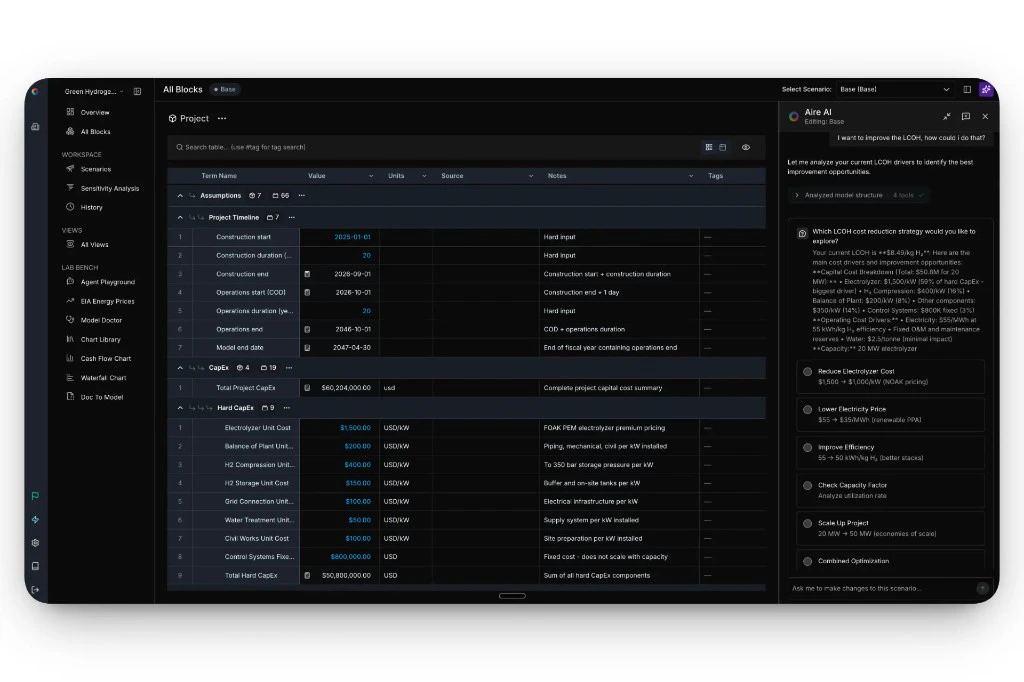
Create Charts from Chat AI
Aire AI can now generate chart previews directly from the blocks chat panel. Describe what you want to visualize in plain language and the chart appears inline in the conversation — no need to navigate to a separate view.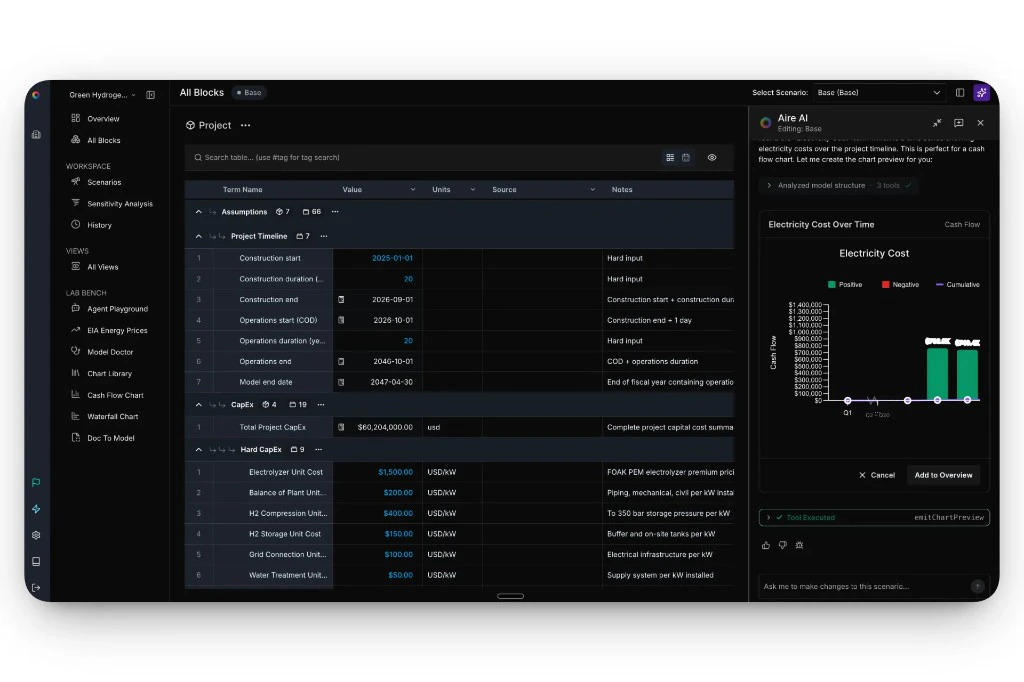
Improvements
- Chat session persistence — The Aire AI chat panel now saves your conversation to local storage, so your session survives page reloads.
- Formula accuracy — Aire AI produces more accurate formulas when writing or editing expressions in your model.
Bug Fixes
- Aire AI formula generation — Formula generation from the formula editor modal was broken in a recent update; now restored.
- Chart legend clipping — The chart legend no longer gets cut off when viewing a chart in full-screen.
- Formula editing on error cells — Pressing
=now enters formula edit mode even when the selected cell is showing a calculation error. - Term search in grid mode — Search now works correctly in grid mode.
- Array values on the scenarios page — Array values were not displaying on the scenarios page; now render correctly.
- Aire AI request cancellation — Cancelling an in-flight Aire AI request now properly stops the underlying network call.
- Currency code persistence — Custom units with a CURRENCY dimension now correctly save and carry their currency code.
Formula Editing from the Grid Modeling
You can now open the formula editor directly from any cell in the grid view. Click into a calculated term and edit its formula without navigating away from your model — keeping your place in the spreadsheet while you work.How to access: In the grid view, click any calculated term to open the formula editor inline.Formula History Tab Modeling
Every formula now has a full version history accessible directly inside the editor. See exactly how an expression has changed over time, who changed it, and when — without leaving the formula editor.How to access: Open the formula editor on any term and select the History tab.Improvements
- Formula editor polish — Improved modal layout, dark mode syntax highlighting, and cleaner display for large vector values that previously caused overflow.
- Sensitivity analysis blank state — The sensitivity analysis view now shows a clear empty state when no data has been configured yet.
- New formula functions —
findheader(),findancestor(), andassoc()are now available for more advanced lookup and navigation within your model. - New unit support — Added short ton, long ton, kBTU, GJ, volt-ampere, and apparent and reactive power units (VA through GVA and VAR through GVAR).
- Unit display aliases — Units now show familiar aliases (e.g. “MW” instead of internal canonical names), making the unit selector easier to read.
Bug Fixes
- The Escape key now reliably closes the formula editor.
- Autocomplete hints now show human-readable labels instead of raw internal IDs.
- The IRR/XIRR solver now converges correctly when the result is a negative rate.
Charts on Project Overview Research Preview
Pin charts directly to your project’s overview page for a persistent visual dashboard. Open a project and your key outputs are immediately visible — no navigation required. Currently available to select organizations as a research preview — contact support for access.- Add any saved chart as a widget from the overview page
- Arrange widgets by dragging them in the grid
- Charts update automatically as your model changes
- Supported chart types: waterfall, bar, line, stacked bar, tornado, KPI card
Cash Flow and Waterfall Charts Research Preview
Two new dedicated chart pages in Lab Bench for deeper financial visualization. Currently available to select organizations as a research preview — contact support for access.- Cash Flow Chart — Visualize project cash flows across your full timeline, organized by period.
- Waterfall Chart — Break down a financial output into its component contributions.
Improvements
- Clone scenario — Now prompts for a name and refreshes immediately — no manual reload required.
- Short-ton unit — Added
ton(short-ton) as a distinct unit, properly separated from metric ton to avoid aliasing errors. - Formula editor — Improved dark mode syntax highlighting and faster formula history loading.
Bug Fixes
- Vector values — Fixed overflow in the formula editor modal for long vector values.
Grid Mode Views
Grid Mode is a spreadsheet-style view of your entire model. It displays all terms across all blocks in a tabular layout, with formulas visible on hover and timelines pinnable as column headers — giving you the density and familiarity of a spreadsheet without leaving Aire.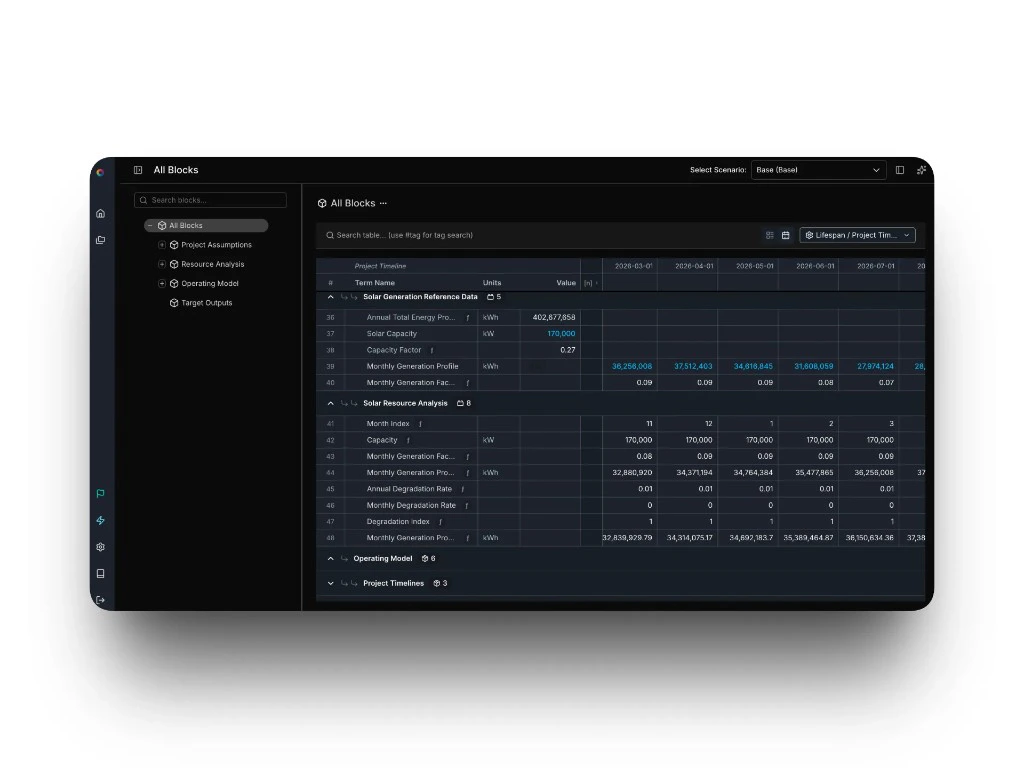
- Formula hovers show the full expression for any calculated term
- Scalar and array values display consistently in the same grid
- Pin timelines as grid headers for time-series navigation
Redesigned Project Home Platform
The project landing page has been redesigned to give you everything you need to orient and get moving. An editable project description, at-a-glance model stats, and navigation shortcuts are now front and center when you open a project.- Editable project description visible from the project home
- Model stats — term count, block count, and case count — displayed at a glance
- Navigation shortcuts to jump directly to key views
Improvements
- Collapsible side panels — Left-hand navigation menus and toolbars can now be collapsed to maximize workspace.
- Horizontal scroll always visible — The horizontal scroll bar is now pinned to the bottom of the all-blocks view for easier navigation.
Bug Fixes
- Formatting (currency $, percentages %, custom date formats like dd-mmm-yy) is now correctly applied to array and time-series terms.
New Features
- Container auto-rerun — Container blocks now re-execute automatically whenever a connected input changes, so your outputs stay in sync without any manual intervention.
- Container log viewer — Runtime logs for each container execution are now accessible directly in the app. Click any error node in your model to jump to the exact log line that caused it.
Bug Fixes
- Terms now land in the correct position when dragged, including across blocks and to the top of a block.
- Deleting a block no longer triggers a full page refresh.
- The horizontal scroll bar now stays visible when zoomed out.
- The unit selector is now available immediately when creating a new term.
- New terms now auto-focus the label field on creation.
New Features
- AI-assisted edits flagged in version history — When a change is made using the AI assistant, the version history now shows an “AI” tag on that entry — so your team can see at a glance which edits involved AI assistance.
Improvements
- Formula stays visible in error rows — You can now inspect the formula for a row even when it’s showing a calculation error, making it easier to diagnose and fix the problem.
- Fuzzy search for terms — Term search now uses fuzzy matching, so you get relevant results even when your query isn’t an exact match.
Bug Fixes
- Tag creation no longer commits before you’ve finished typing.
- Tables no longer rubber-band or snap back unexpectedly while scrolling.
- Extra whitespace above the header row no longer appears.
Improvements
- Shareable version URLs in project history — The selected scenario is now reflected in the URL, so you can share or bookmark a specific version comparison view directly.
- Change history search finds more — Search results now include terms matched by formula value and error state, not just label name.
- Change history is easier to read — Changed entries are visually highlighted, numbers display with proper formatting, and removed units and tags are identified by name instead of appearing blank.
- More accurate change history data — Project created and updated dates now reflect the correct timestamps, and percentage-based fields like discount rates no longer display incorrect currency symbols.
Bug Fixes
- Horizontal scrolling in the spreadsheet view now works correctly when the cursor is near sticky columns.
- Live collaboration sessions no longer stop syncing for active sessions.
- The Enter key now reliably re-enters edit mode after confirming a cell edit.
New Features
retime()— Maps a phase-scoped array to your full project timeline. If you have costs spread across 8 construction months,retime()automatically places them in the right positions across a 20-year model — no manual padding or repeated formulas needed.sumby()andunique()— Two new functions for working with categorized data.sumby()aggregates values by a matching category — sum costs by technology type, outputs by phase, and so on.unique()returns the distinct values from an array, useful when you need a clean list of categories to work with.- Smarter error recovery in the AI assistant — When the assistant encounters a formula error while editing, it now incorporates the error message into its reasoning and attempts to self-correct or explain what went wrong — reducing back-and-forth.
Improvements
- AI assistant chat auto-scrolls — The chat panel now scrolls to the latest response automatically after the assistant replies.
- Cleaner navigation breadcrumbs — Removed redundant organization and project name repetition from the main breadcrumb trail.
- Clearer drag-and-drop feedback — Moving a term now shows more distinct visual cues while dragging, making reorganization easier to follow.
Bug Fixes
- Clearing a term’s description or notes field now saves correctly without corrupting the model.
- “Last Updated” timestamps on the project overview page now reflect the correct time.
- Numbers in AI assistant responses now format correctly in markdown.
- Values in the version history side panel now display in full.
- Version history views now render correctly in dark mode.
- Date and timestamp column headers in version history are now correctly aligned.
Improvements
- Softer warning and alert colors — Warning banners and error indicators now use calmer, lower-contrast colors for a less jarring experience.
- Confirmation before deleting a view or analysis — Destructive actions now show a clear confirmation dialog.
- More intuitive tag creation — An empty tag area now shows a plus button that opens the existing tag picker, making it clear how to add tags to a term.
Bug Fixes
- Pressing Tab after confirming a table cell edit now moves focus to the next cell as expected.
- Blocks created from the left-hand navigation panel now appear in the “move term to” dropdown.
- Numbers in AI assistant responses now render correctly in all markdown contexts.
- Delete confirmation dialog text now displays with sufficient contrast to be readable.
Project History with Version Control Collaboration
Every change to your project is now automatically tracked and versioned. View a complete timeline of edits, compare versions, and restore previous states with a single click. Project History surfaces who changed what, when, and why — essential for audit trails and team collaboration.- Timeline view shows all model changes with timestamps
- Diff view compares any two versions side-by-side
- One-click restore to any previous state
- Automatic tracking requires no setup or manual saves
Redesigned Tables Views
Working with large models just got faster. Tables on All Blocks and Scenarios now keep headers visible as you scroll, so you always know what you’re looking at. Edit values directly in the table — no more opening sidebars for every change. Customize which columns you see, search to find specific terms instantly, and benefit from tighter spacing that fits more data on screen without sacrificing readability.- Frozen headers stay visible while scrolling horizontally
- Edit term values directly in the table
- Show or hide columns based on what you need
- Search to quickly locate terms in large models
- Denser layout fits more information on screen
- Blue text instantly identifies editable inputs
- Column settings persist automatically
AI-Powered Project Insights AI
Project AI now analyzes your entire model and generates natural language insights about financial performance, risk factors, and optimization opportunities. Ask questions in plain English and get answers grounded in your actual project data.- Natural language queries about any project metric
- Automated identification of key risk drivers
- Suggestions for model improvements and optimizations
- Context-aware responses reference specific terms and blocks
Source Documentation Modeling
Sources provide traceable references for every assumption in your model. Link terms to research papers, test data, manufacturer specs, or past projects. Build credibility and simplify due diligence with embedded documentation.- Attach multiple sources to any term
- Support for URLs, file uploads, and text notes
- Source badges visible in Assumptions view
- Filter and search by source type or citation